用法解释 - combine_rtf
combine_rtf()
功能
将指定的一个或多个文件夹内的rtf文档,按照指定的toc文件进行顺序合并为一个rtf文档,可选择是否加TOC。
运行要求
提前准备好rtf文档,放置在一个或多个文件夹内;
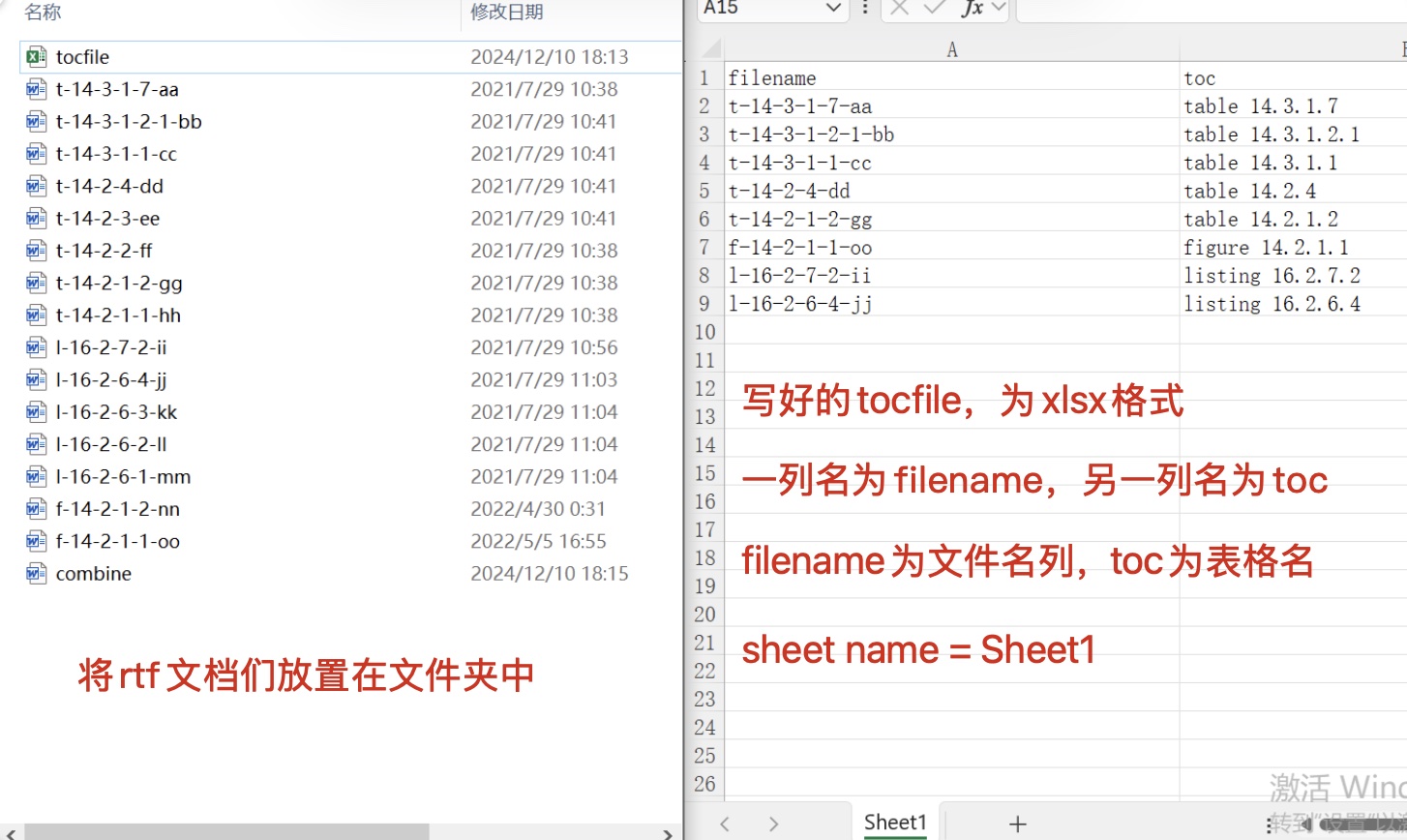
如果有目标TOC,请提供xlsx格式的tocfile(见图片模板样式);
根据实际情况调整row_of_toc_in_a_page参数,如果一页放置不下,请根据结果调整数值。
运行步骤
填写参数;
运行代码
| 参数 | 意义 |
|---|---|
| srcpath | 需要读取rtf文档的文件夹路径,可以是一个或者多个,写法分别如下: one path: ['C:/folder/example1/'] multiple paths: ['C:/folder/exampl1/', 'C:/folder/example2/'] |
| inclist | 指定需要纳入合并的rtf文档, inclist='l-16',代表仅合并文档名中包含l-16的rtf文档; inclist=None,代表全部rtf文档都纳入合并。 |
| exclist | 指定需要排除合并的rtf文档, exclist='l-16',代表排除合并文档名中包含l-16的rtf文档; exclist=None,代表无需排除任何文档。 |
| addtoc | 是否给合并后的rtf文档加TOC,如果需要加则填写为addtoc='Y',否则填写addtoc='N'。 在不提供tocfile时,若addtoc='Y'则程序自动按照table/figure/listing以及文件名的顺序进行排序生成TOC; 在提供tocfile时,程序会按照tocfile的顺序生成TOC。 |
| row_of_toc_in_a_page | TOC页面里每页放置行数。请根据生成的文档情况自行调整,若行数溢出页面则会造成文档总页数不正确。 若TOC页面每页放置20行则填写:row_of_toc_in_a_page=20 |
| tocfile | 如需指定TOC,则填写xlsx格式tocfile的文件夹路径(tocfile具体样式见下文) 写法:tocfile=r'C:\Users\tocfile.xlsx' 如不指定TOC,则填写为tocfile=None |
| outpath | 输出combine后rtf的文件夹路径 |
| outfile | 输出combine后rtf的文件名 |
示例
首先将需要合并的rtf放置在指定文件夹,然后准备tocfile。
tocfile为两列,filename列按照顺序放置rtf名称;toc列是rtf内TFLs的名称;sheet name命名为Sheet1。
运行程序:
from TFLsTool import combine_rtf

combine_rtf(
    srcpath=[r'C:\combine_rtf\docs'], # Source folder path contains .rtf files, one path: ['C:/folder/example1/'], multiple paths: ['C:/folder/exampl1/', 'C:/folder/example2/']
    inclist=None, # 'l-16', .rtf files to be included only, None: all files
    exclist=None, # 'l-16', .rtf files to be excluded
    addtoc='Y', # Add TOC at the beginning of combined file
    row_of_toc_in_a_page=35, # Maximum number of rows in each TOC page
    tocfile=r'C:\combine_rtf\docs\tocfile.xlsx', # If TOC file(2 columns[filename/toc] in Sheet1) provided, use it for TOC
    outpath=r'C:\combine_rtf\output', # The folder to store the combined file
    outfile='combine' # The file name of the combined file
)
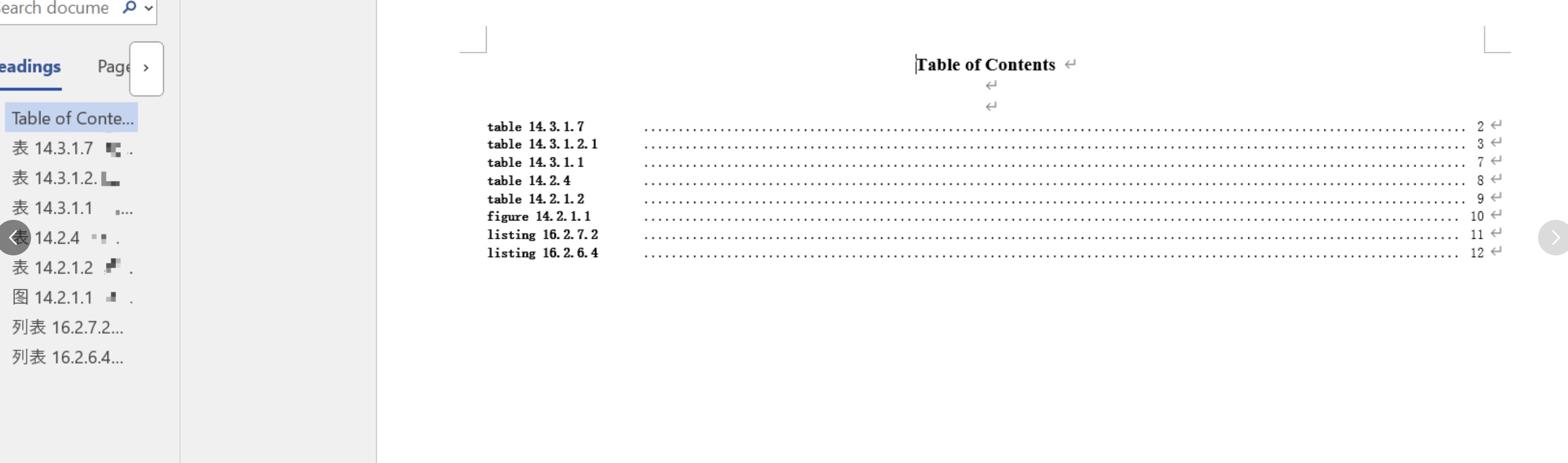
得到如下结果: